 MPXAir docs
Using MPXAir
Flight modes, failsafes and battery
What each switch position does, what happens when something goes wrong, and how much battery is left.
Flight modes
Setup → Flight modes lists the six positions of your mode switch with their PWM ranges. Choose a mode for each. The row for the current switch position is highlighted live, so flick the switch to check. Copters also have Simple and Super simple boxes. Press Save modes.
Failsafes
Setup → Failsafe groups the settings for:
- Radio (throttle) failsafe: what to do when the RC signal is lost.
- Battery failsafe: low and critical voltage or mAh, and the actions.
- Ground station failsafe: lost telemetry.
- EKF failsafe: a bad position estimate.
- Return to launch: RTL altitude, final altitude, loiter time, speed.
The live line at the top shows the throttle input and warns if it is below the failsafe value.
Battery monitor
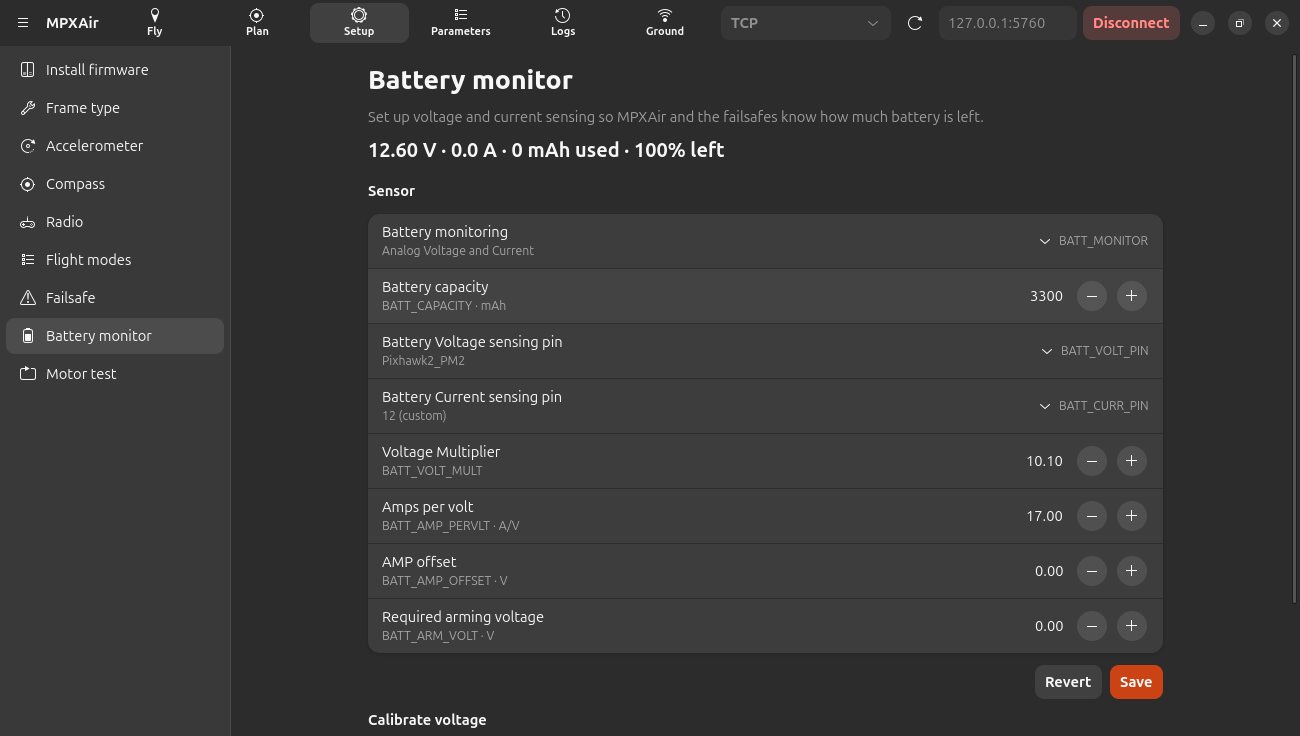
Set the sensor type, capacity, pins and scaling. Each setting shows its full value under its name, and hovering shows what it does.
Calibrate the voltage
- Measure the battery with a multimeter.
- Enter the reading in Measured voltage and press Apply measured voltage.
- MPXAir corrects
BATT_VOLT_MULTso the reported voltage matches.